
Account protection
Protect sign-in and stay in control of connected devices.
- Two-factor authentication
- App passwords for mail clients
- Session management
Email, conversations, calls, and shared work.
Your organization’s complete control.
Oneemail by OneewaeeD-U-N-S® verified
Your own domain, a modern mailbox, encrypted chat, calls, calendar and Drive in one workspace, on the web and on Android. Your mail data stays in Nepal, close to your team.
Oneewaee Tech Pvt. Ltd. · D-U-N-S® 557779858
No migration team, no hardware, no long contract. Set up the workspace, check everything, then switch when you are ready.
Email is where it starts. Chat, calls, calendar, contacts and Drive keep the rest of your work close, all on your domain and all managed from one dashboard.
A focused business inbox with search, scheduled send, snooze, and follow-ups.
Encrypted direct and group conversations, files, reactions, and calls in your business workspace.
Organize personal and company files, manage versions, and share documents with controlled access.
Personal and shared calendars, recurring events, invitations, and compatible calendar sync.
Personal contacts, shared business address books, and your company directory in one workspace.
Voice, video, and supported screen sharing from direct and group business conversations.
Manage domains, people, roles, policies, usage, and billing from one dashboard.
Two-factor sign-in, domain authentication, attachment risk checks and encryption you can choose.
Explore real views from the mailbox and organization dashboard. Enlarge a capture, inspect the controls, or watch a short clip.
Move between folders, filter unread or starred messages, and keep the reading pane beside your inbox. Calendar, contacts, and your other tools stay within reach.
Real interface. Captured from Oneemail. Private content is covered; some views are cropped.
01 / 06Oneemail for Android
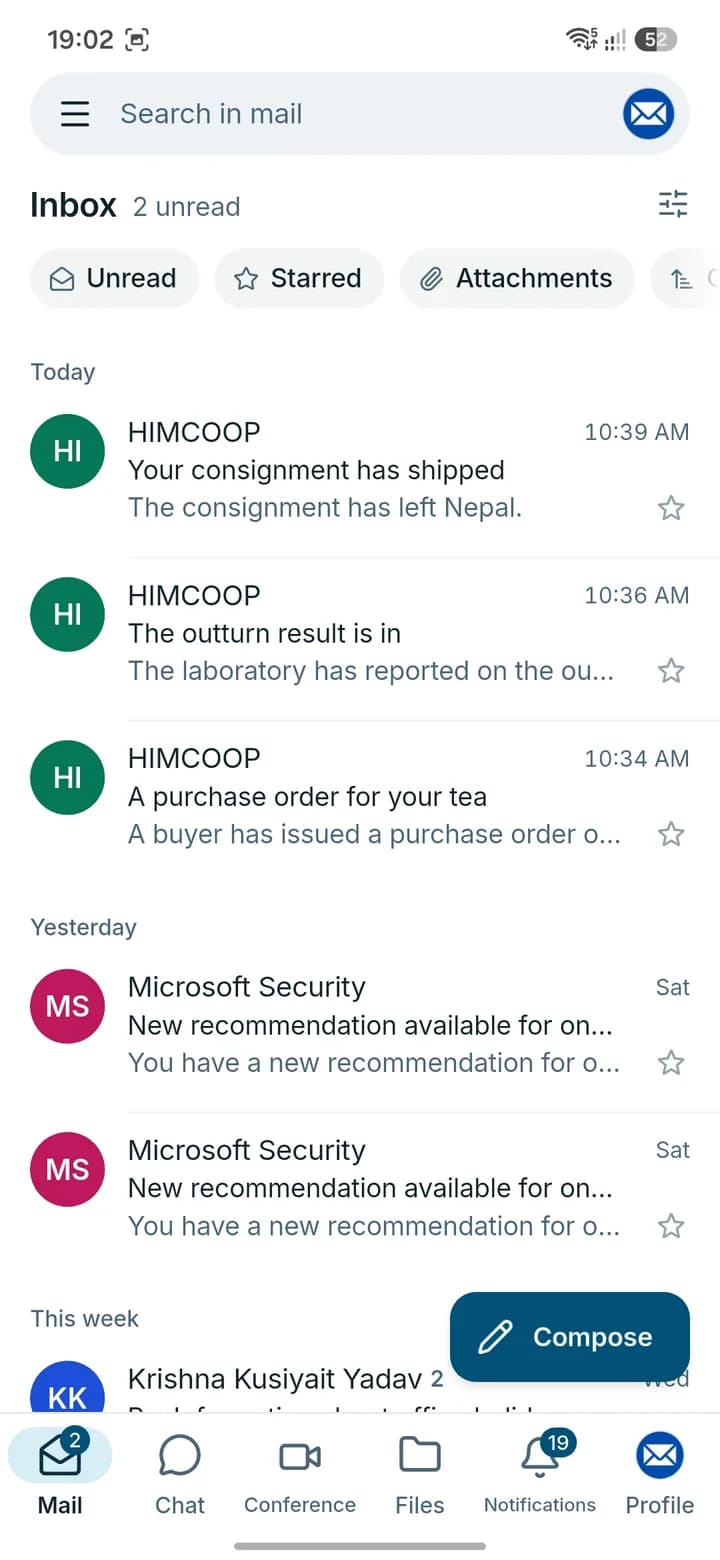
Mail, end-to-end encrypted chat, calls and Conference meetings in one Android app. Sign in with the mailbox your organization created for you. These are real screens from the app.
Read, reply and organize mail on the same mailbox your team uses on the web.
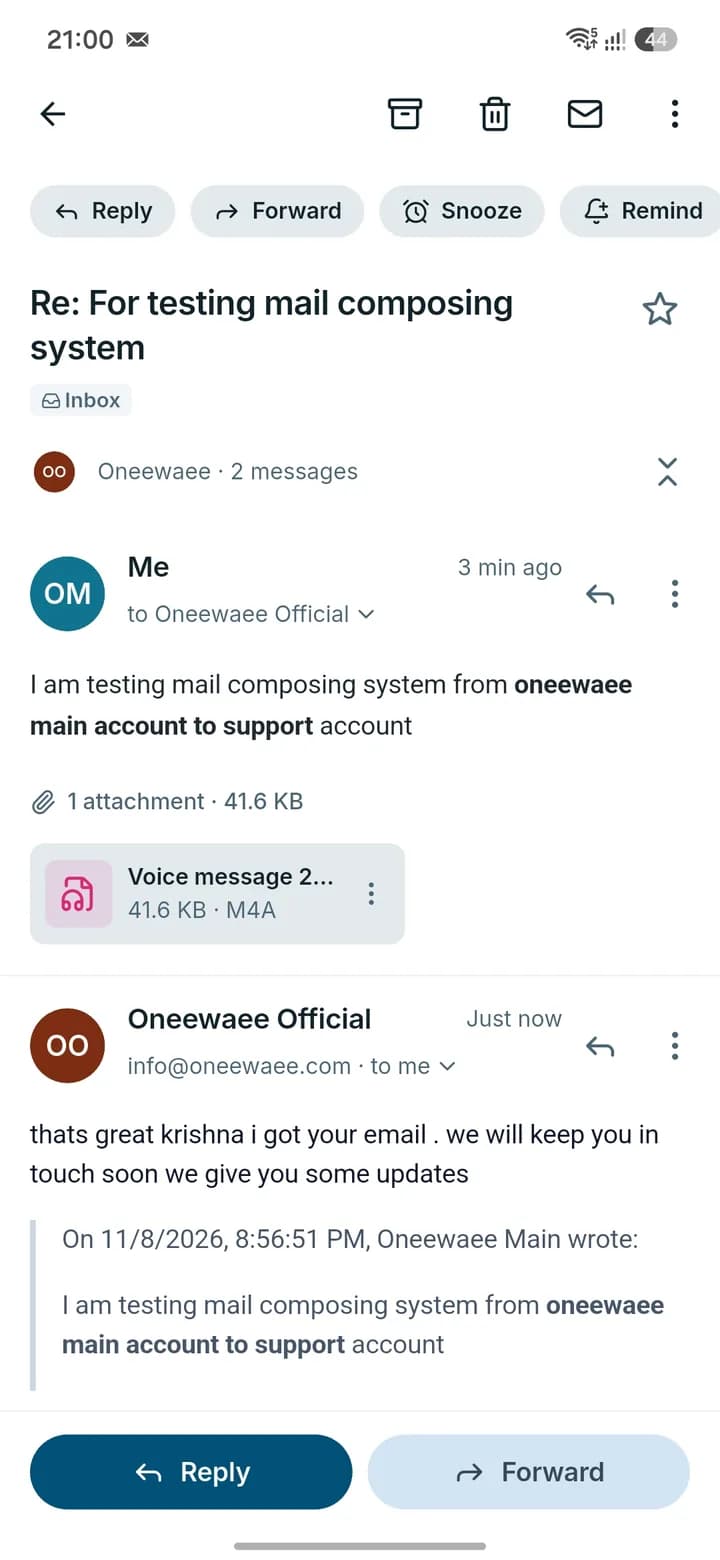
Actual Oneemail Android app screens.
Documents stored in Oneemail are encrypted and kept on AWS S3, with keys managed in AWS KMS and access rules checked on every request.
Every document is protected with encryption keys, so stored files are unreadable to anyone who is not authorized.
Files travel over encrypted connections and are stored with AES-256 encryption, from upload to download.
Share with specific people, review who has access, and let administrators set the rules for the organization.
Need protection on email itself? Users can add OpenPGP or S/MIME encryption with their own keys.
Explore Oneemail securityThe Oneemail mail system hosts your data on servers in Nepal. That means lower latency and quicker speeds for your team, and a mailbox that stays within national boundaries.
Mail is served from servers in Nepal, so your team is a short hop away. Fewer network round trips mean a mailbox that opens and responds quickly.
Your mailbox data resides within national boundaries, giving your organization clarity about where its email lives.
Plans priced in Nepalese rupees, a D-U-N-S® verified company behind the product, and a team you can reach directly.
Controls for both people and administrators, from sign-in to the documents you store.
Protect sign-in and stay in control of connected devices.
Understand the sender and see the risks before you act.
Add an extra layer for conversations that need it.
Copy email from Gmail, Microsoft 365, Zoho, and other supported IMAP providers. Review the import, run a final sync, and move your mail routing when your team is ready.
Start free with one mailbox and 1 GB. Add storage and capabilities as your team grows, and compare the details before you decide.
One mailbox. No card. No time limit.
NPR 01 mailbox · per organizationBusiness email with 6 GB per person.
NPR 250per mailbox / monthThe same essentials, with 12 GB per person.
NPR 450per mailbox / monthMore storage. More business capability.
NPR 750per mailbox / monthMonthly base subscription prices. Applicable taxes and add-ons extra.
In Nepal, pay from any bank or wallet by scanning our Fonepay QR or choosing your bank in Checkout by Fonepay. From India, pay directly with your own UPI app.
Any mobile banking app or wallet


Directly from your own UPI app

Yes. Use addresses such as you@yourcompany.com. Add your domain, verify ownership, and follow the DNS checklist in the organization dashboard. Your website can stay with its current host.
Yes. Import from supported IMAP sources including Gmail, Microsoft 365, Zoho, Yahoo, and iCloud. Test the connection, copy your mail, and sync new messages before changing mail routing. IMAP migration leaves messages in your old mailbox.
The Oneemail mail system hosts your mailbox data on servers in Nepal. Your mail data resides within national boundaries, and being close to your team means lower latency and faster speeds when you open, search, and send mail.
Documents stored in Oneemail are protected with end-to-end encryption keys and bank-grade security. Behind the scenes, files are kept on AWS S3 with encryption keys managed in AWS KMS, and strict security enforcement applies to every request. Files are protected in transit and at rest.
Yes. The Oneemail Android app brings mail, end-to-end encrypted chat, voice and video calls, Conference meetings and Drive to your phone, and it is coming to Google Play. Sign in with the mailbox your organization created for you. The iPhone app is coming soon.
Your team uses app.oneewaee.email for their mailbox and connected tools. Administrators use mailadmin.oneewaee.email to manage domains, mailboxes, roles, security, migration, and billing. Mailbox users do not need admin membership.
Set up your domain, bring your team, and manage it all from one dashboard. Start free, with no card needed.